
Castle ऐप डाउनलोड लिंक यहाँ है
फ़िल्म और टेलीविज़न कॉपीराइट शिकायतों से संबंधित Google की नीति के कारण Castle ऐप Play Store पर लॉन्च नहीं हुआ है। लेकिन Castle ऐप सुरक्षित है, इसमें कोई वायरस या मैलवेयर नहीं है। हम अपने उपयोगकर्ताओं के हितों और आनंद को पहले रखते हैं, आपके विश्वास के लिए धन्यवाद।
Castle APK कैसे स्थापित करें?
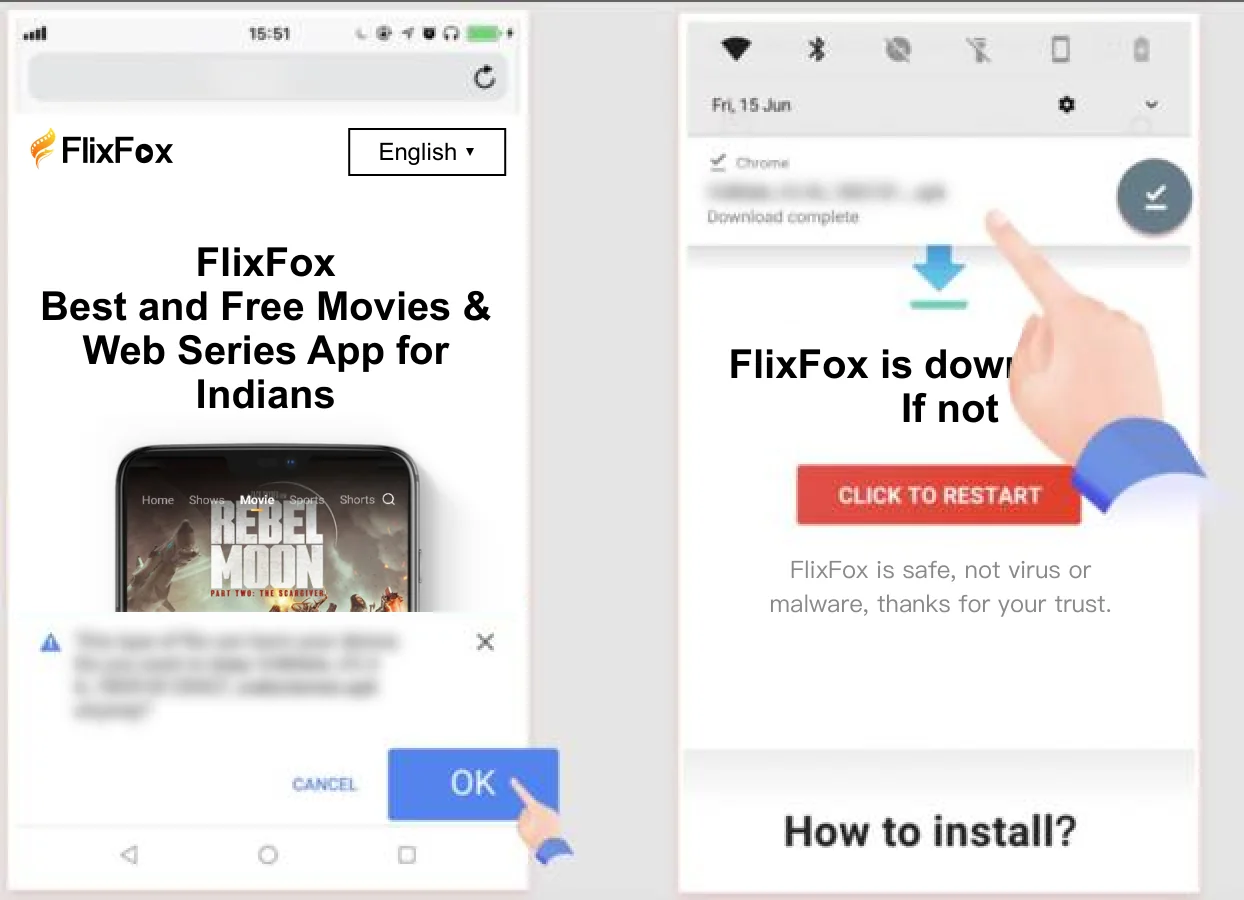
1. Chrome पर 'OK' क्लिक करें, फिर डाउनलोड के बाद डाउनलोड पूर्ण अधिसूचना पर क्लिक करें। Chrome पर APK फ़ाइल डाउनलोड करते समय चेतावनियाँ हो सकती हैं। जारी रखने के लिए 'OK' पर क्लिक करें। Castle APK सुरक्षित है, आपके विश्वास के लिए धन्यवाद।
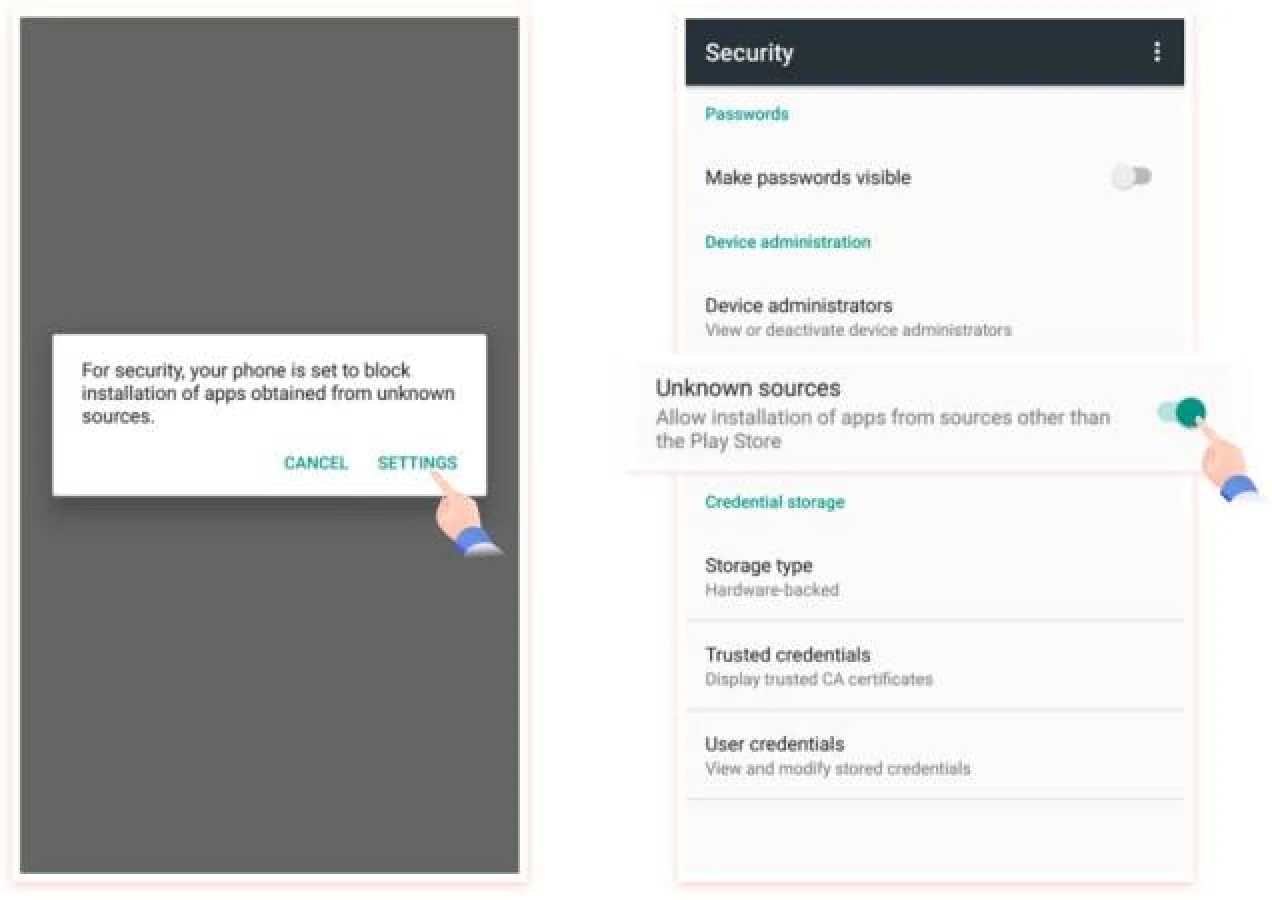
2. 'SETTINGS' पर क्लिक करें फिर 'unknown sources' चालू करें, आपको Google Play Store के बाहर ऐप इंस्टॉल करने के लिए विकल्पों को चालू करने की आवश्यकता है।
FAQ
How to download and install Castle App APK?
Open your Android browser and visit castletvapp.vip. Tap the Download button to get the latest Castle APK file. Open the file from your Downloads folder, enable "Install from unknown sources" if prompted, then tap Install. Open Castle and start streaming for free.
Is Castle App completely free?
Yes, completely free. Downloading, installing, watching movies, web series, and streaming live TV are all free, with no payment required.
What is the latest version of Castle App?
Castle App v2.1.1 is the latest official version, available for direct APK download from this page.
How to update Castle App to the latest version?
When a new version is available, you can update directly inside the app. If the in-app update does not work, visit our website to download the latest APK manually. Tip: do not uninstall the old version before updating, so you keep your downloaded content.
Is Castle App safe to install?
Yes. The Castle APK is officially built, signed with a consistent developer key, and checked through multi-engine malware scans before every release.
Where can I download the official Castle App?
The official Castle App is available exclusively at castletvapp.vip and our alternate official site. Avoid third-party download sources to make sure you get the genuine, unmodified APK.
What devices does Castle App support?
Castle App works on Android 6.0 and above, including phones, tablets, Android TV boxes, and Fire TV Stick. It can also run on PC through an Android emulator.
How to use Castle App on PC or laptop?
Install an Android emulator such as BlueStacks on your Windows PC or laptop, open its browser, download the Castle APK, and install it inside the emulator. Then launch Castle and start watching.
Can I use Castle App on iPhone, iPad, or Smart TV?
Castle App is built for Android, so it works on Android phones, tablets, Android TV, and Fire TV Stick. iPhone and iPad are not supported natively, but iOS users can run Castle on a PC through an Android emulator.
Which languages does Castle App support?
Castle App supports English and 11 major Indian languages — Hindi, Tamil, Telugu, Malayalam, Bengali, Marathi, Punjabi, Kannada, Gujarati, Odia, and Assamese — with dubs and subtitles across most titles.
Can I download movies for offline viewing?
Yes. Castle App supports offline downloads. Save your favourite movies and web series locally and watch them later without an internet connection.
Can Castle App run on older Android phones?
Yes, as long as your Android version is 6.0 or above. The Castle APK is optimised to run smoothly even on entry-level phones.